

Built4U TMS for carriers
Custom‑built,done‑for‑you TMSfor your fleet.
Rate cons read automatically by AI, with your rules.BOL and POD photos go straight from the driver's cab into your invoice, built in seconds.
For carriers running 3 to 100 trucks. From $350/month, month-to-month.
 Load lifecycle · every load moves through 6 stages
- Rate con inAI reads stops, pay and load number. You check and confirm.
- DispatchedA big warning before you dispatch on an expired document.
- On the roadStatus updates itself from the ELD. Far fewer check calls.
- DeliveredBOL and POD photos go straight from the driver's cab.
- Invoiced and factoredThe POD builds the invoice. Factoring in one click.
- Driver settledWeekly settlements with your pay rules.
Built4U TMS for carriers · pricing
$350/monthfor up to 5 trucks, plus $50 per additional truck.
- Unlimited users
- Month-to-month
- 30-day money-back guarantee
- 10 trucks
- $600/month
- 40 trucks
- $2,100/month
Features
One system for loads, drivers, money and safety, set up the way your company runs.
Rate cons and paperwork
We learn your regular brokers and shippers and build that into your own AI. So it reads yours the way you would.
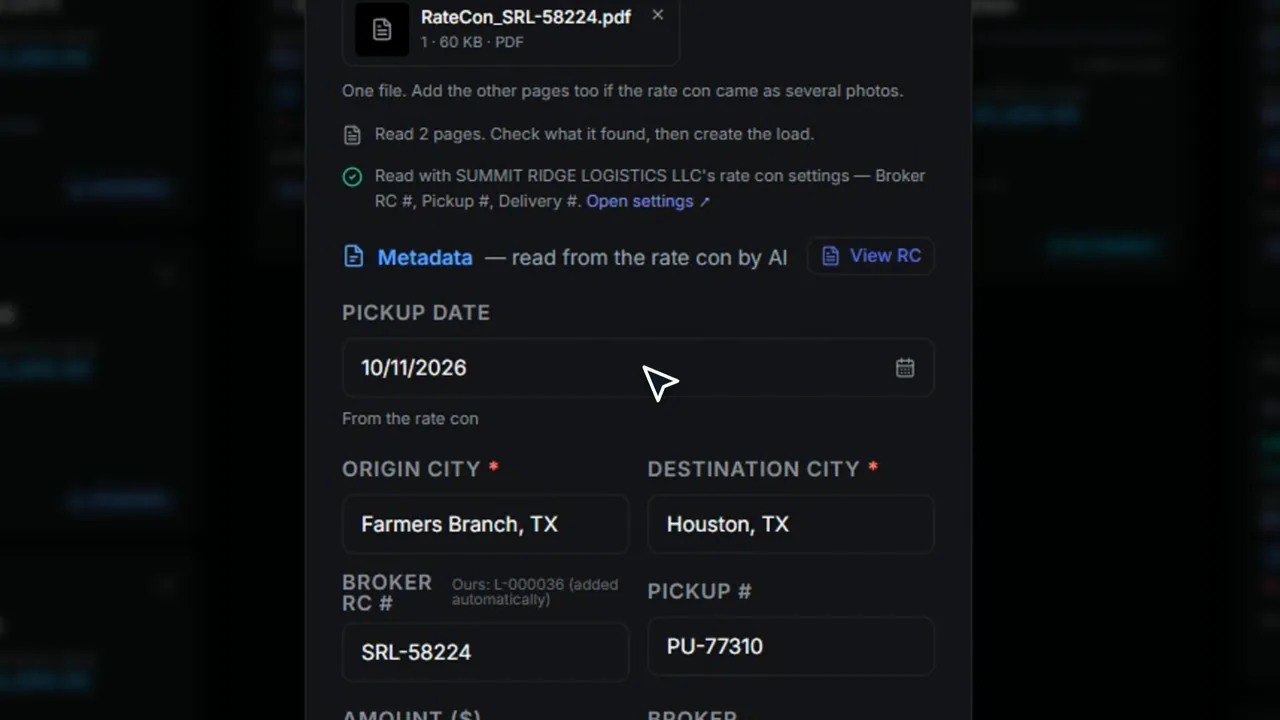
Rate con to load
Drop in a rate con. AI reads stops, pay and load number, you check and confirm.
Learns each broker's layout
Fix a broker's labels once and every rate con from them reads right after that.
No duplicate loads
Same rate con twice or a double click? You still get one load.
Clean scans automatically
Every BOL, POD and receipt photo is cropped, cleaned up and sharpened. The original is kept.
Wrong paper caught early
Upload a work permit as a medical card and it's refused before it's filed.
Expiry dates read for you
AI reads expiry dates on CDLs, medical cards and truck papers and warns before they lapse.
Trust score on papers
Each paper gets a 0–100 score with plain reasons, so odd ones get a second look.
POD problem flags
AI flags PODs that look unsigned, short or damaged before you bill.
Driver app
4 taps or a 12-step workflow, you decide. Or zero taps: the ELD moves the trip status, and the driver just snaps the paperwork.
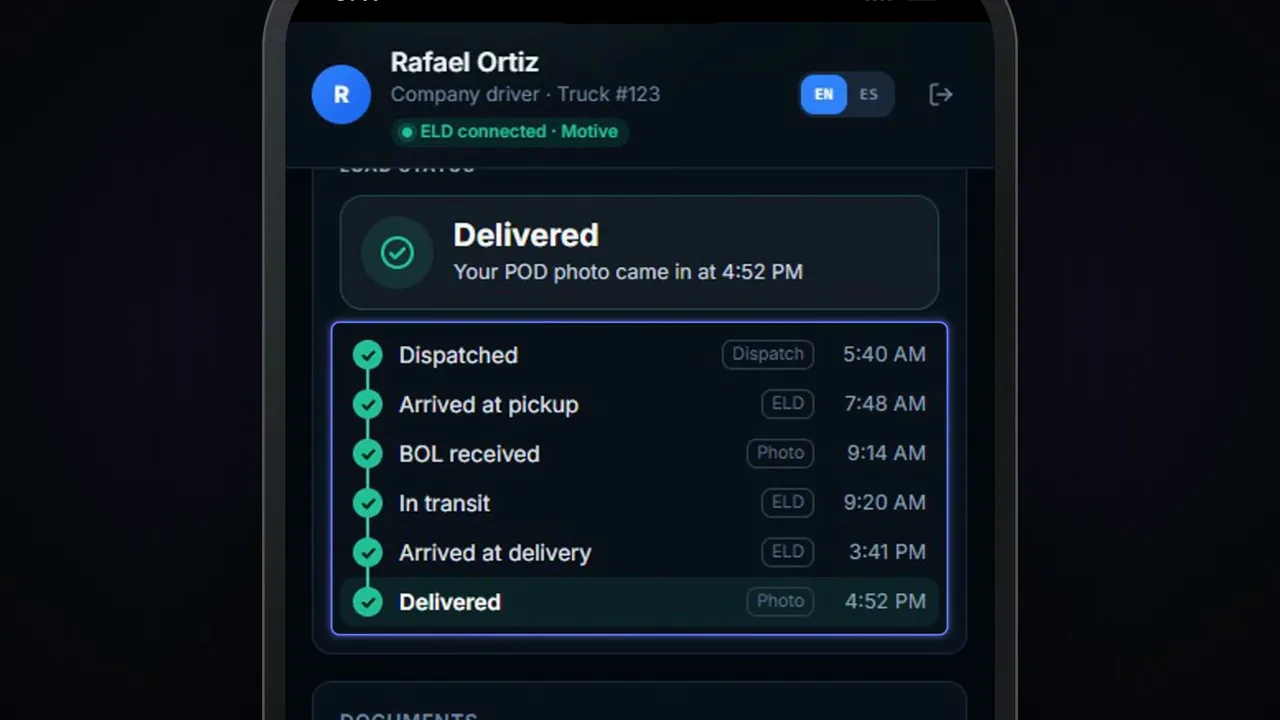
Five steps per load
Accept, at pickup, BOL photo, at delivery, POD photo. The paperwork moves the load.
BOL and POD photos
Multi-page photos, gallery or PDF. Add a page later or retake one.
Built-in page scanner
After each photo, the phone finds the page edges. The driver can adjust the corners.
Undo a wrong tap
Tapped the wrong step? Undo it right from the phone.
Pay slips on the phone
Drivers see weekly pay and download pay slips, with an alert when one is ready.
Chat with dispatch
One thread per driver: photos, voice notes, files, location. Messages send when signal returns.
Push alerts for drivers
Drivers get a ping for new loads, changes, missing papers, expiring documents and messages.
Works without signal
Taps wait for signal and send on their own, so dead zones don't lose updates.
English or Spanish
The whole driver app in English or Spanish, the driver's choice.
Truck papers at roadside
Drivers pull up registration, insurance and permits for their truck at an inspection.
One-tap navigation
Open the stop in Trucker Path or Google Maps with one tap.
Rates stay private
Broker names and load pay never show on the driver's phone.
Invoices and factoring
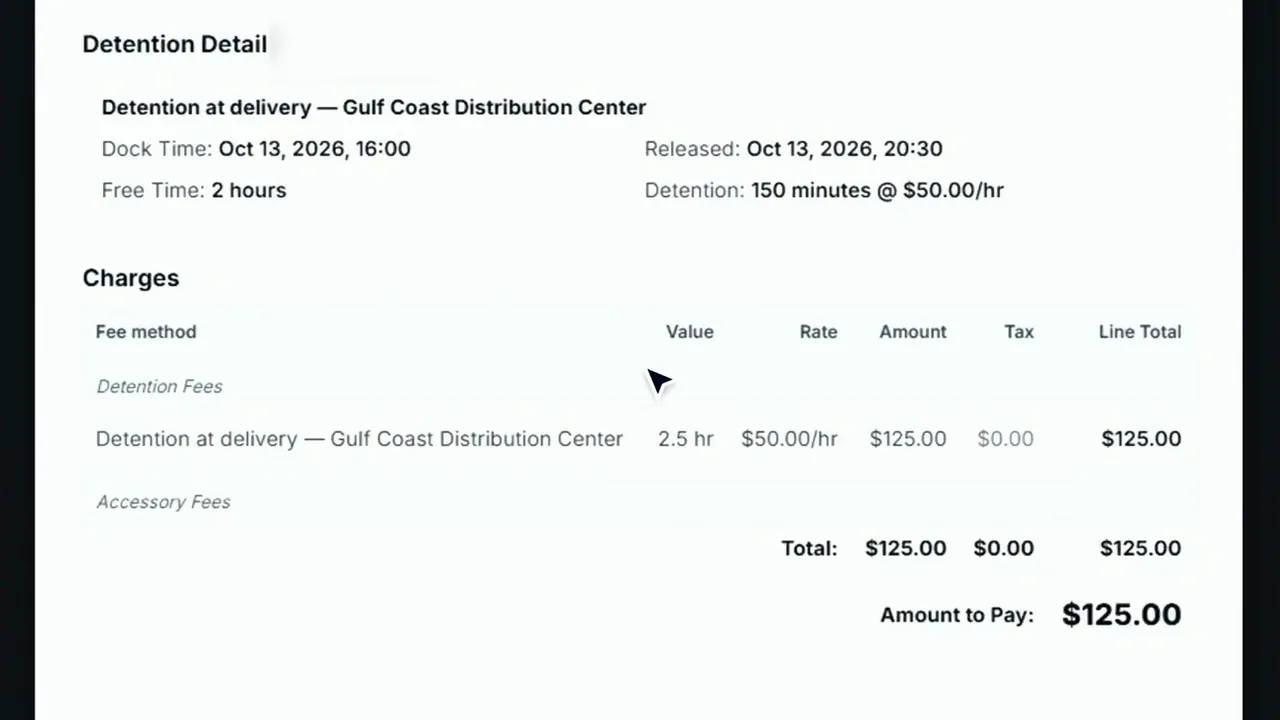
Your invoice, in your PDF format, with your company details. BOL and POD attached. Detention invoices built automatically, with ELD pings as proof.
POD becomes the invoice
The moment the POD lands, the invoice draft is built with the paperwork attached.
Send invoices in bulk
Send one invoice or a whole batch with paperwork attached, after a quick preview.
Factoring in one click
Send invoices with paperwork to TriumphPay or BasicBlock without leaving the TMS.
Paid status from factor
When BasicBlock pays, the invoice closes as Paid and the fee is booked.
Detention billed right
Detention time from taps or the ELD becomes its own invoice or a line on the freight bill.
TONU handled
Mark a truck-ordered-not-used load, attach the proof and a one-line TONU invoice is ready.
Clean corrections
Edit, void or correct with a credit note and a new number, so the books stay clean.
QuickBooks sync
Invoices, credit memos and settlements push to QuickBooks Online. CSV export if you'd rather.
Overdue at a glance
Search invoices and see what's overdue and what's been paid, all in one list.
Payroll and settlements
No two companies run payroll the same way. Our engineers study your past payrolls, learn your process, and code it exactly.
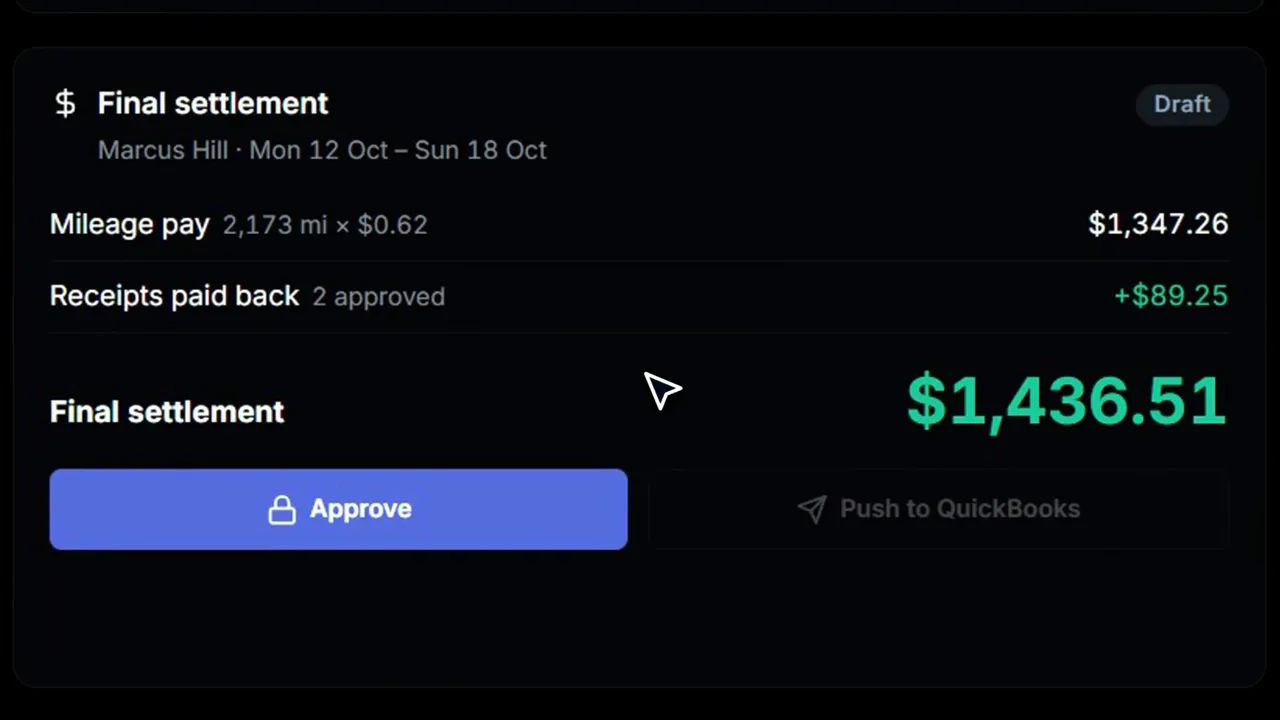
Weekly settlements
Build weekly pay sheets, approve them and export statements. Advances, deductions and receipts included.
Pay rules your way
Pay by the mile, load, day or percentage, with company defaults and per-driver overrides.
Owner-operator pay
Pay owner-ops a percentage of the agreed route price, with their own weekly statement.
Miles from the ELD
Company-driver mileage pay comes straight from Motive. Not on Motive? Miles are estimated from loads.
Check before you pay
"Show me first" previews any pay change before it touches a week, with the reason logged.
Statements emailed out
Approved statements email to each driver automatically. You pick who gets one.
Settlements to QuickBooks
Approved settlements post to QuickBooks as bills, so accounting doesn't retype them.
ELD-based tracking
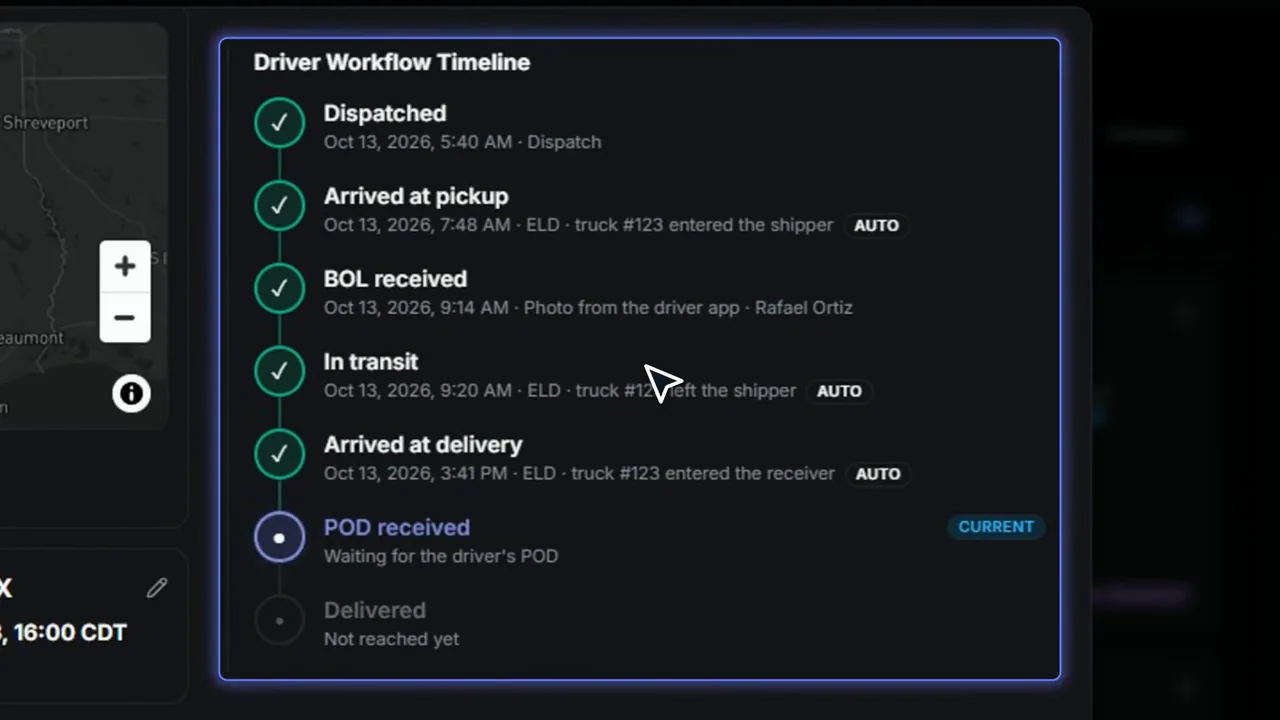
Every live trip tracked from the ELD. Brokers get status updates the moment things happen. Far fewer check calls.
ELD connections
Connect Motive, Samsara or Geotab. We set it up with your account key.
Fleet imported from ELD
Hook up the ELD and missing trucks, trailers and drivers are created for you.
Status updates itself
When the truck reaches or leaves a stop, the load status updates from the ELD.
Next-stop ETA
Each load shows On time, At risk or Late for the next stop.
Load map
See the stop fences and the truck's latest position on one map.
Detention clocks
Clocks start and stop from arrivals and departures, so detention bills on real times.
Broker status emails
Brokers get pickup and delivery updates from your own address, so fewer check calls.
Customer tracking link
Share a no-login link so customers can check load status and ETA themselves.
Safety and fleet health
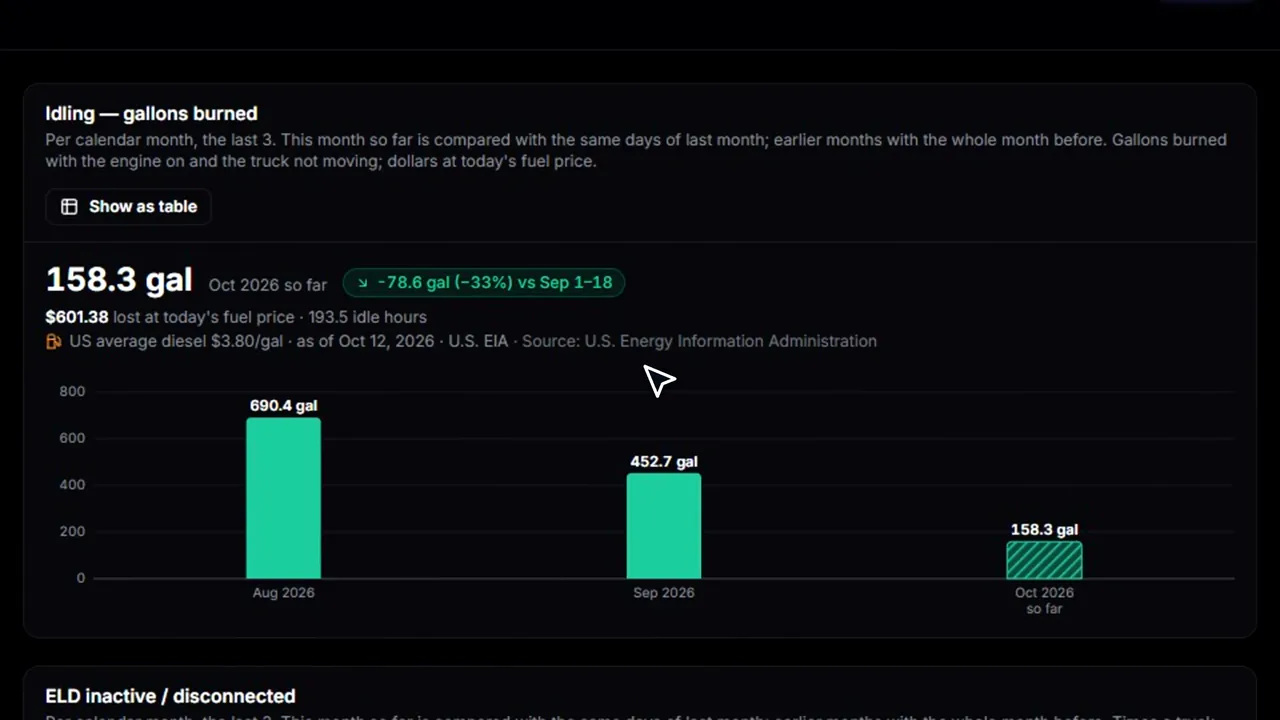
Everything your ELD knows, turned into action: risk ranking, speeding, harsh events, idling cost, HOS violations, ELD gaps and possible fuel theft.
Driver risk ranking
Drivers ranked by risk score. You set how much each behavior counts.
Speeding by severity
Speeding sorted into Low, Medium and Critical bands, by driver and truck.
Harsh braking and cornering
Hard brakes and hard corners logged per driver, so coaching starts with facts.
Idling cost in dollars
Idle time turned into dollars using the daily U.S. diesel price.
Potential fuel theft flags
Long idles that burn more fuel than the truck should get a 0–100 score and an AI note.
HOS violations
HOS violations by type, plus live hours left for each driver, read from the ELD.
ELD inactive gaps
See when an ELD went dark and which driver had the truck.
Fleet health board
Faults, inspections, fuel and odometer for every truck, sorted by what needs attention first.
AI truck assessment
AI reads each truck's faults and inspections and gives a plain headline, urgency and next steps.
Behavior trends
6, 12 and 24-month behavior summaries for driver reviews and insurance renewals.
Hiring and dispatch checks
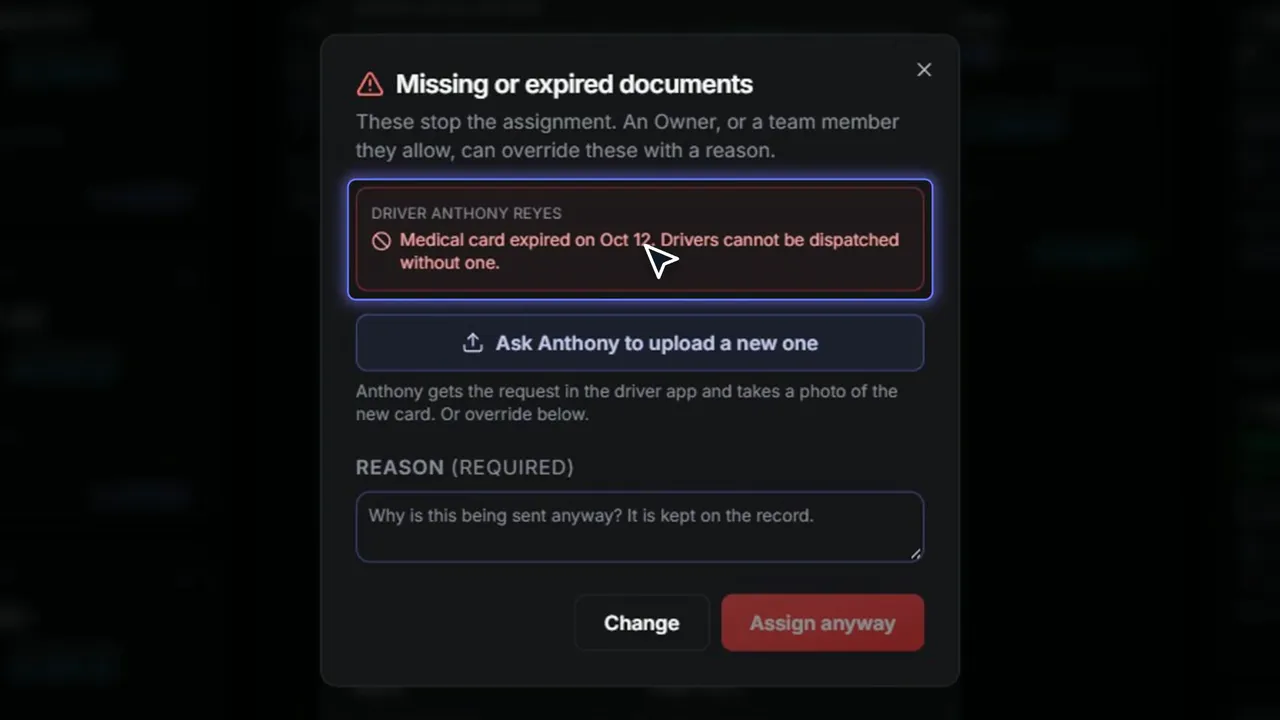
A big warning before you dispatch on an expired document. Stop it here, not on the side of the road.
Onboarding with office approval
New drivers send papers from the app and can't be dispatched until every required paper is approved.
Hire checks
Automatic checks for expired or missing papers, name mismatches and non-domiciled CDLs before you hire.
AI onboarding summary
A numbered to-do list on each new driver: CDL restrictions, medical card, MVR, drug test age and more.
Required papers before dispatch
Missing or expired CDL, MVR, medical card or drug test stops the assignment until fixed or overridden.
Checks at assignment
Assigning a load? Trucks and drivers with paper problems show greyed out, with the reason.
Overrides on the record
Only people you allow can override a paper stop, and every override is logged with a reason.
Running the office
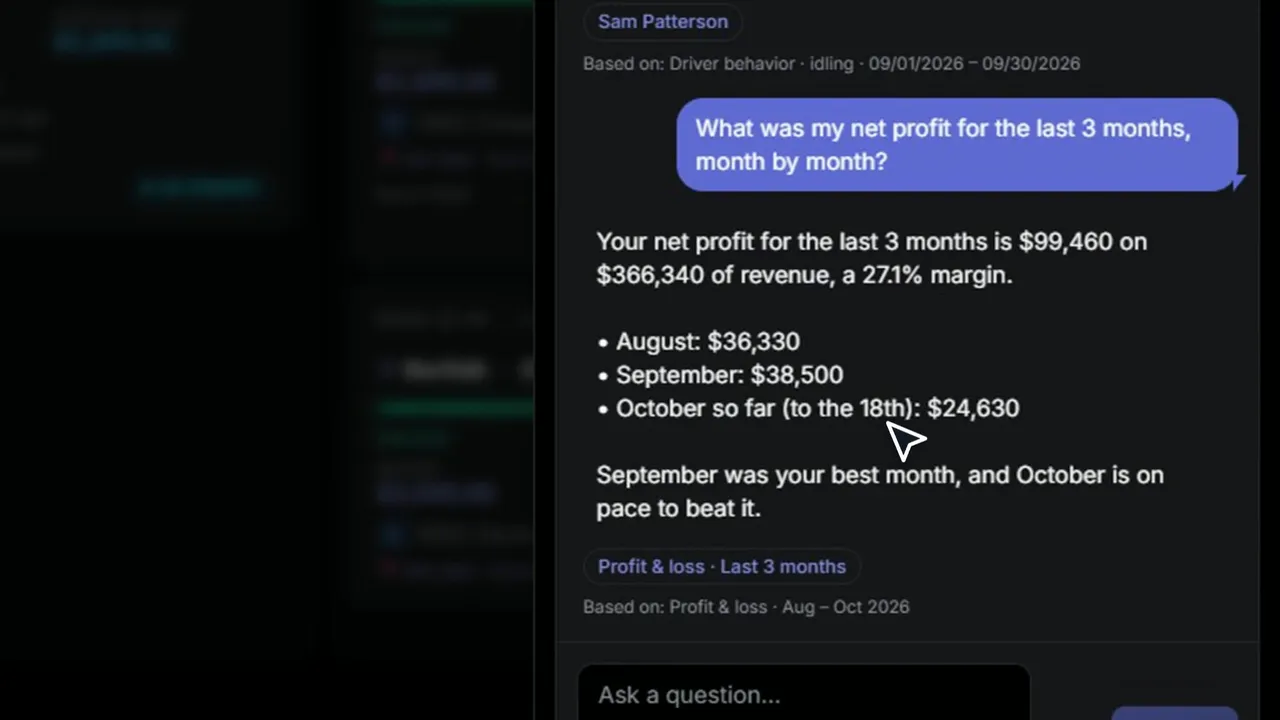
Ask your business anything. Which loads are at risk? Who's my best driver for a bonus? Answers come from your own data, with sources. Read-only.
Notice board
Everything that needs a person, in three columns, with one-click fixes and Undo.
Ask AI
Ask in plain words: where's load 1042, which loads are late, who's speeding most.
Profit and loss
Revenue, costs and net by month, plus which lanes and trucks make or lose money.
Company mailbox
Connect your Gmail or Outlook once. Invoices, updates and statements go out from your address.
Office push alerts
Your phone pings when a pickup is done, a load delivers, a paper lands or a driver writes.
Phone layout and themes
Use it on a phone or tablet. Pick light, dark or your own color theme.
IFTA miles by state
State miles from your ELD drop into a quarterly IFTA worksheet you can export.
Team permissions
Give dispatch and accounting the access they need, with an audit trail.
Your brand on it
Your logo and name on the sign-in pages and the driver app.
Archive, never delete
Archive a load at any status and restore it later. Nothing gets deleted.
Want to see it on your own loads? Book 30 minutes with us.
Book a demoHow we're different
Built4U TMS next to a typical TMS.
Built around your operation
Built4U TMS
We build the features your process needs
Typical TMS
One shared product you configure
Who you call
Built4U TMS
Your dedicated software engineer, never more than 10 customers each
Typical TMS
A support team or a business-hours line
A tool you use isn't connected
Built4U TMS
We talk to your vendor and build it
Typical TMS
Pick from their list, or use the API yourself
Ready to see the difference? Show us how you run today, and we'll show you what we'd build.
Book a demoWorks with the tools you already use.
















- +300 more
Using something else? Tell us. We'll talk to them and build the connection. Carrier checks use public FMCSA data.
In their own words

Instagram reel
“I had to go tab to tab to tab just to get one answer. Now everything's right there on one page.”
“Upload the load confirmation, assign the load, and boom, we're done.”
Book a demo
See it with your own loads.
Book 30 minutes with us. Show us how you run today, and we'll show you what we'd build.
30-minute demo
Custom TMS demo with Nick G
Book a demo(opens in a new tab)Or email nickg@truckingwithai.com. We reply within one business day.